ELIXIR-SCO Spatial Omics Data Analysis 2026
Spatially-resolved transcriptomics data formats
Day 1 - Practical 0
6th October 2026
Jonas Windhager (NBIS)
Adapted from the MGC/BioSB Spatial Omics Analysis course 2025 by Benedetta Manzato (LUMC) with the help of Åsa Björklund (NBIS) and Claude Fable 5.
- Introduction to AnnData
- Introduction to SpatialData
- Accessing images
import warnings
warnings.filterwarnings("ignore")
# Importing necessary libraries for spatial data analysis and visualization
import matplotlib.pyplot as plt
import numpy as np
import pandas as pd
import scanpy as sc
import seaborn as sns
# Display the version of important packages for reproducibility
sc.logging.print_header()
# Set the default aesthetics for Scanpy plots
sc.set_figure_params(facecolor='white', figsize=(8, 8)) # White background, figure size 8x8
sc.settings.verbosity = 0 # Set verbosity to show only errors (0) # errors (0), warnings (1), info (2), hints (3)
AnnData format
Expression matrices are stored in the anndata h5ad format and need to be downloaded to a local file system for usage.
Key Components of an AnnData Object:
- .X: The main data matrix (usually cells by genes), where the rows are cells and the columns are genes. It typically stores raw or normalized gene expression data.
- .obs: Observations (metadata about the cells), such as cell type, experimental conditions, or quality control metrics.
- .var: Variables (metadata about the genes), such as gene names or other annotations.
- .obsm: Multi-dimensional annotations of cells, such as dimensionality reduction results (e.g., PCA, UMAP coordinates).
- .uns: Unstructured annotations, typically storing experimental metadata or plot settings.
- .layers: Stores multiple versions of the data matrix (e.g., raw counts, normalized data, etc.).
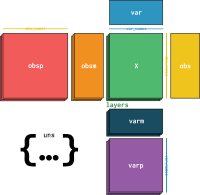
- Question: where do you expect spatial coordinates to be stored?
Dataset: Xenium In Situ of an Alzheimer's disease mouse brain (TgCRND8, 17.9 months)
This dataset is a coronal section of one brain hemisphere of an adult mouse, profiled with the 10x Genomics Xenium In Situ platform (imaging-based spatial transcriptomics). The sample (FFPE) comes from a well-characterized transgenic Alzheimer's disease model (TgCRND8) at the age of 17.9 months. A panel of 347 genes (the Xenium mouse brain panel with 248 genes plus a 99-gene custom add-on) was measured across ~62,000 segmented cells and ~63 million decoded transcripts.
The Xenium output bundle (Xenium_V1_FFPE_TgCRND8_17_9_months_outs) contains, among others:
experiment.xenium: experiment specifications (e.g. pixel size, panel).cell_feature_matrix.h5: cell-by-gene count matrix (10x HDF5 format).cells.parquet: cell metadata (centroids, areas, counts).cell_boundaries.parquet/nucleus_boundaries.parquet: cell and nucleus boundary polygons.transcripts.parquet: decoded transcripts with their coordinates.morphology_mip.ome.tif/morphology_focus.ome.tif: DAPI (nuclear) images.analysis.tar.gz: onboard secondary analysis (clustering, differential expression).
The same dataset will be used in the following practicals (cell segmentation, imaging-based data analysis).
The data was retrieved from
10x Genomics
and is available in the shared course data directory ../data/Xenium_V1_FFPE_TgCRND8_17_9_months_outs
(populated by the course's download script).
For more details: 10x Genomics dataset page and the Xenium In Situ application note.
Xenium output file formats: https://www.10xgenomics.com/support/software/xenium-onboard-analysis/latest/analysis/xoa-output-understanding-outputs
Read data
xenium_dir = "../data/Xenium_V1_FFPE_TgCRND8_17_9_months_outs"
# the cell-by-gene count matrix is stored in the 10x HDF5 format, which scanpy can read directly
adata = sc.read_10x_h5(f"{xenium_dir}/cell_feature_matrix.h5")
adata
AnnData object with n_obs × n_vars = 62268 × 347
var: 'gene_ids', 'feature_types', 'genome'
layers: None (.X)
The count matrix alone does not tell us where the cells are. The cell metadata (including the cell centroids) is stored in a separate Parquet file, which we read with pandas and attach to .obs (the row order matches the count matrix):
cells = pd.read_parquet(f"{xenium_dir}/cells.parquet")
cells["cell_id"] = cells["cell_id"].str.decode("utf-8") # cell IDs are stored as bytes
cells = cells.set_index("cell_id")
adata.obs = adata.obs.join(cells)
adata
AnnData object with n_obs × n_vars = 62268 × 347
obs: 'x_centroid', 'y_centroid', 'transcript_counts', 'control_probe_counts', 'control_codeword_counts', 'unassigned_codeword_counts', 'total_counts', 'cell_area', 'nucleus_area'
var: 'gene_ids', 'feature_types', 'genome'
layers: None (.X)
Access cell metadata with .obs
adata.obs
| x_centroid | y_centroid | transcript_counts | control_probe_counts | control_codeword_counts | unassigned_codeword_counts | total_counts | cell_area | nucleus_area | |
|---|---|---|---|---|---|---|---|---|---|
| aaabiggh-1 | 831.785336 | 755.803772 | 554 | 0 | 0 | 0 | 554 | 509.091563 | 65.386250 |
| aaacfoel-1 | 821.733453 | 768.910446 | 291 | 0 | 0 | 0 | 291 | 275.498281 | 36.982969 |
| aaaeefil-1 | 831.932053 | 780.367651 | 220 | 1 | 0 | 0 | 221 | 261.635312 | 15.849844 |
| aaaehidd-1 | 853.614108 | 774.764157 | 1029 | 0 | 0 | 0 | 1029 | 818.547344 | 129.056563 |
| aaagcbkg-1 | 821.639603 | 799.171515 | 453 | 0 | 0 | 1 | 454 | 522.232031 | 96.002188 |
| ... | ... | ... | ... | ... | ... | ... | ... | ... | ... |
| oindmjog-1 | 5068.380664 | 4446.804883 | 35 | 0 | 0 | 0 | 35 | 229.709844 | 15.985313 |
| oinecaba-1 | 5072.841504 | 4459.385132 | 124 | 0 | 0 | 0 | 124 | 359.353438 | 18.423750 |
| oinehfmf-1 | 5251.196240 | 4366.193091 | 15 | 0 | 0 | 0 | 15 | 686.329844 | 24.745625 |
| oinemiil-1 | 5248.493506 | 4382.190356 | 22 | 0 | 0 | 0 | 22 | 333.478906 | 20.681563 |
| oingfoec-1 | 5272.023315 | 4387.369629 | 18 | 0 | 0 | 0 | 18 | 750.948438 | 9.798906 |
62268 rows × 9 columns
Access feature metadata with .var
adata.var
| gene_ids | feature_types | genome | |
|---|---|---|---|
| 2010300C02Rik | ENSMUSG00000026090 | Gene Expression | Unknown |
| Abca7 | ENSMUSG00000035722 | Gene Expression | Unknown |
| Acsbg1 | ENSMUSG00000032281 | Gene Expression | Unknown |
| Acta2 | ENSMUSG00000035783 | Gene Expression | Unknown |
| Acvrl1 | ENSMUSG00000000530 | Gene Expression | Unknown |
| ... | ... | ... | ... |
| Vwc2l | ENSMUSG00000045648 | Gene Expression | Unknown |
| Wfs1 | ENSMUSG00000039474 | Gene Expression | Unknown |
| Zfp366 | ENSMUSG00000050919 | Gene Expression | Unknown |
| Zfp536 | ENSMUSG00000043456 | Gene Expression | Unknown |
| Zfpm2 | ENSMUSG00000022306 | Gene Expression | Unknown |
347 rows × 3 columns
print(f"Total number of cells/spots in this section: {adata.shape[0]}")
print(f"Size of the gene panel: {adata.shape[1]}")
Total number of cells/spots in this section: 62268 Size of the gene panel: 347
In .obs we see per-cell metadata such as transcript_counts, cell_area and nucleus_area, as well as the cell centroids x_centroid and y_centroid (in µm).
The Xenium onboard analysis also provides an unsupervised (graph-based) clustering of the cells (analysis.tar.gz). We add it to .obs as a categorical annotation (cells excluded from the onboard clustering get a missing value):
import tarfile
with tarfile.open(f"{xenium_dir}/analysis.tar.gz") as tar:
clusters = pd.read_csv(
tar.extractfile("analysis/clustering/gene_expression_graphclust/clusters.csv"),
index_col="Barcode",
)
adata.obs["cluster"] = pd.Categorical(
clusters["Cluster"].reindex(adata.obs_names).astype("Int64").astype(str),
categories=[str(c) for c in sorted(clusters["Cluster"].unique())],
)
adata.obs["cluster"].value_counts(dropna=False)
cluster 1 6331 2 4663 3 4548 4 4359 5 4182 6 3528 7 3384 8 3051 9 2615 10 2558 11 2264 12 2120 13 1864 14 1766 15 1557 16 1521 17 1495 18 1495 19 1450 NaN 1439 20 1030 21 997 22 911 23 899 24 621 25 555 26 538 27 527 Name: count, dtype: int64
We can plot the annotations spatially in a scatterplot (using scanpy.pl.scatter or scanpy.pl.spatial).
Scanpy (and other spatial analysis tools) require adata.obsm['X_spatial'] or adata.obsm['spatial']. It is not yet present in our object (the coordinates only exist as columns of .obs), so we add it:
adata.obsm["spatial"] = adata.obs[["x_centroid", "y_centroid"]].to_numpy()
adata.obsm["spatial"]
array([[ 831.7853363 , 755.80377197],
[ 821.73345337, 768.91044617],
[ 831.93205261, 780.36765137],
...,
[5251.19624023, 4366.19309082],
[5248.49350586, 4382.19035645],
[5272.02331543, 4387.36962891]], shape=(62268, 2))
annotations = ['cluster', 'transcript_counts']
for ann in annotations:
fig, ax = plt.subplots(figsize=(8, 8))
sc.pl.scatter(
adata,
x='x_centroid',
y='y_centroid',
color=ann,
ax=ax,
size=10,
show=False,
title=ann.replace('_', ' ').capitalize()
)
ax.invert_yaxis()
ax.axis('equal')
ax.set_xlabel('X Coordinate')
ax.set_ylabel('Y Coordinate')
ax.tick_params(axis='both', which='both',
bottom=False, left=False,
labelbottom=False, labelleft=False)
ax.grid(False)
plt.tight_layout()
plt.show()


Alternatively we can plot a simple scatterplot with seaborn/matplotlib directly from adata.obs.
# Create the subplots
fig, axes = plt.subplots(1, 2, figsize=(15, 7.5))
fig.suptitle('Scatter Plots of Different Annotations', fontsize=16)
# Plot 'cluster' (categorical)
sns.scatterplot(ax=axes[0], x='x_centroid', y=-adata.obs['y_centroid'], hue='cluster', palette='tab20', data=adata.obs, s=4, legend=False)
axes[0].set_title('Cluster')
axes[0].set_xlabel('X Coordinate')
axes[0].set_ylabel('Y Coordinate')
axes[0].set_aspect('equal')
axes[0].tick_params(axis='both', which='both', bottom=False, left=False, labelbottom=False, labelleft=False)
axes[0].grid(False) # Remove grid
# Plot 'transcript_counts' (continuous)
sns.scatterplot(ax=axes[1], x='x_centroid', y=-adata.obs['y_centroid'], hue='transcript_counts', palette='viridis', data=adata.obs, s=4, legend=False)
axes[1].set_title('Transcript counts')
axes[1].set_xlabel('X Coordinate')
axes[1].set_ylabel('Y Coordinate')
axes[1].set_aspect('equal')
axes[1].tick_params(axis='both', which='both', bottom=False, left=False, labelbottom=False, labelleft=False)
axes[1].grid(False) # Remove grid
plt.tight_layout(rect=[0, 0, 1, 0.96])
plt.show()

You can also plot the gene expression of genes of interest:
genes_toplot = ['Slc17a7', 'Penk', 'Gfap']
sc.pl.spatial(adata, color=genes_toplot, spot_size=20)

Building blocks of anndata.AnnData class
Metadata
.obs and .var: These are stored as pandas.DataFrame objects to handle metadata efficiently.
Use cases include filtering, subsetting, and quick visualizations.
#### `pandas.DataFrame`
Let's filter the AnnData object to keep only cells assigned to cluster 1 or 2
adata_filtered_obs = adata[adata.obs['cluster'].isin(['1', '2'])]
adata_filtered_obs
View of AnnData object with n_obs × n_vars = 10994 × 347
obs: 'x_centroid', 'y_centroid', 'transcript_counts', 'control_probe_counts', 'control_codeword_counts', 'unassigned_codeword_counts', 'total_counts', 'cell_area', 'nucleus_area', 'cluster'
var: 'gene_ids', 'feature_types', 'genome'
uns: 'cluster_colors'
obsm: 'spatial'
layers: None (.X)
- Exercise: Filter the AnnData object to keep only cells assigned to cluster
'3'
adata_filtered_obs = adata[adata.obs['cluster'] == '3']
adata_filtered_obs.obs
| x_centroid | y_centroid | transcript_counts | control_probe_counts | control_codeword_counts | unassigned_codeword_counts | total_counts | cell_area | nucleus_area | cluster | |
|---|---|---|---|---|---|---|---|---|---|---|
| aabblhbk-1 | 831.906165 | 844.420578 | 105 | 0 | 0 | 0 | 105 | 126.663281 | 16.436875 | 3 |
| aacmjcce-1 | 822.455258 | 856.651364 | 142 | 0 | 0 | 0 | 142 | 197.287656 | 7.450781 | 3 |
| aadbolko-1 | 590.532520 | 865.743988 | 179 | 0 | 0 | 0 | 179 | 622.795000 | 20.591250 | 3 |
| aaecjbfl-1 | 829.358240 | 368.995251 | 124 | 0 | 0 | 0 | 124 | 230.071094 | 29.125781 | 3 |
| aaeecbmn-1 | 826.277924 | 381.758247 | 47 | 0 | 0 | 0 | 47 | 282.091094 | 24.971406 | 3 |
| ... | ... | ... | ... | ... | ... | ... | ... | ... | ... | ... |
| oibmklmg-1 | 4416.401611 | 311.657242 | 133 | 0 | 0 | 0 | 133 | 260.190313 | 24.248906 | 3 |
| oieckffg-1 | 4907.441797 | 662.475339 | 196 | 0 | 0 | 0 | 196 | 257.526094 | 31.473906 | 3 |
| oienoode-1 | 4924.513184 | 699.942886 | 149 | 0 | 0 | 0 | 149 | 195.932969 | 16.527188 | 3 |
| oikhpgjh-1 | 4206.703540 | 552.846558 | 226 | 0 | 0 | 0 | 226 | 381.750938 | 30.119219 | 3 |
| oingfoec-1 | 5272.023315 | 4387.369629 | 18 | 0 | 0 | 0 | 18 | 750.948438 | 9.798906 | 3 |
4548 rows × 10 columns
- Exercise: Filter the AnnData object to keep only
Gad1, Cst3, Apoegenes
Reminder: we can think of .obs as the rows of a pandas dataframe and .var as the columns
adata_filtered_var = adata[...] # replace ... with your selection
adata_filtered_var.var
| gene_ids | feature_types | genome | |
|---|---|---|---|
| 2010300C02Rik | ENSMUSG00000026090 | Gene Expression | Unknown |
| Abca7 | ENSMUSG00000035722 | Gene Expression | Unknown |
| Acsbg1 | ENSMUSG00000032281 | Gene Expression | Unknown |
| Acta2 | ENSMUSG00000035783 | Gene Expression | Unknown |
| Acvrl1 | ENSMUSG00000000530 | Gene Expression | Unknown |
| ... | ... | ... | ... |
| Vwc2l | ENSMUSG00000045648 | Gene Expression | Unknown |
| Wfs1 | ENSMUSG00000039474 | Gene Expression | Unknown |
| Zfp366 | ENSMUSG00000050919 | Gene Expression | Unknown |
| Zfp536 | ENSMUSG00000043456 | Gene Expression | Unknown |
| Zfpm2 | ENSMUSG00000022306 | Gene Expression | Unknown |
347 rows × 3 columns
scipy.sparse Matrices

Large datasets (e.g., single-cell or spatial datasets) are often sparse, meaning most of the matrix entries are zero. To save memory and computation time, these matrices are stored in sparse formats.
Common Formats:
scipy.sparse matrices:
csr_matrix(Compressed Sparse Row): Efficient for row slicing.csc_matrix(Compressed Sparse Column): Efficient for column slicing.coo_matrix(Coordinate): Useful for constructing sparse matrices.
- Is the AnnData object currently in a dense or sparse format?
### check adata count matrix
### hint: where is the count matrix stored?
from scipy import sparse
# Convert the count matrix to a sparse CSR matrix
# (a no-op here: the 10x HDF5 format already stores the counts sparsely)
sparse_X = sparse.csr_matrix(adata.X)
adata.X = sparse_X
NumPy Arrays

Dense data operations and algorithms that don’t support sparse matrices directly often require converting the sparse .X matrix to a NumPy array.
Convert sparse to dense matrix:
import scipy.sparse as sp
dense_array = adata.X.toarray() if sp.issparse(adata.X) else adata.X
dense_array
array([[4., 2., 1., ..., 0., 0., 1.],
[0., 0., 1., ..., 0., 0., 1.],
[0., 0., 5., ..., 0., 0., 2.],
...,
[0., 0., 0., ..., 0., 0., 0.],
[0., 0., 0., ..., 0., 0., 0.],
[0., 0., 0., ..., 0., 0., 0.]], shape=(62268, 347), dtype=float32)
Convert AnnData count matrix to pandas dataframe:
adata_df = adata.to_df()
adata_df
| 2010300C02Rik | Abca7 | Acsbg1 | Acta2 | Acvrl1 | Adamts2 | Adamtsl1 | Adgrl4 | Aldh1a2 | Aldh1l1 | ... | Unc13c | Vat1l | Vcan | Vim | Vip | Vwc2l | Wfs1 | Zfp366 | Zfp536 | Zfpm2 | |
|---|---|---|---|---|---|---|---|---|---|---|---|---|---|---|---|---|---|---|---|---|---|
| aaabiggh-1 | 4.0 | 2.0 | 1.0 | 0.0 | 0.0 | 0.0 | 0.0 | 0.0 | 0.0 | 0.0 | ... | 0.0 | 4.0 | 0.0 | 0.0 | 0.0 | 3.0 | 0.0 | 0.0 | 0.0 | 1.0 |
| aaacfoel-1 | 0.0 | 0.0 | 1.0 | 0.0 | 0.0 | 0.0 | 0.0 | 0.0 | 0.0 | 2.0 | ... | 0.0 | 0.0 | 0.0 | 1.0 | 0.0 | 2.0 | 0.0 | 0.0 | 0.0 | 1.0 |
| aaaeefil-1 | 0.0 | 0.0 | 5.0 | 0.0 | 0.0 | 0.0 | 0.0 | 0.0 | 0.0 | 0.0 | ... | 1.0 | 0.0 | 0.0 | 0.0 | 0.0 | 0.0 | 1.0 | 0.0 | 0.0 | 2.0 |
| aaaehidd-1 | 6.0 | 2.0 | 3.0 | 0.0 | 0.0 | 1.0 | 0.0 | 1.0 | 0.0 | 0.0 | ... | 0.0 | 8.0 | 0.0 | 1.0 | 0.0 | 4.0 | 4.0 | 0.0 | 0.0 | 2.0 |
| aaagcbkg-1 | 2.0 | 3.0 | 1.0 | 0.0 | 0.0 | 0.0 | 0.0 | 1.0 | 0.0 | 3.0 | ... | 0.0 | 2.0 | 0.0 | 3.0 | 0.0 | 0.0 | 0.0 | 0.0 | 0.0 | 2.0 |
| ... | ... | ... | ... | ... | ... | ... | ... | ... | ... | ... | ... | ... | ... | ... | ... | ... | ... | ... | ... | ... | ... |
| oindmjog-1 | 0.0 | 0.0 | 0.0 | 0.0 | 0.0 | 0.0 | 1.0 | 0.0 | 0.0 | 0.0 | ... | 0.0 | 0.0 | 0.0 | 2.0 | 0.0 | 0.0 | 0.0 | 0.0 | 0.0 | 0.0 |
| oinecaba-1 | 1.0 | 0.0 | 0.0 | 0.0 | 0.0 | 0.0 | 0.0 | 0.0 | 3.0 | 0.0 | ... | 0.0 | 0.0 | 0.0 | 1.0 | 0.0 | 0.0 | 0.0 | 0.0 | 0.0 | 0.0 |
| oinehfmf-1 | 0.0 | 0.0 | 0.0 | 0.0 | 0.0 | 0.0 | 0.0 | 0.0 | 0.0 | 0.0 | ... | 0.0 | 0.0 | 0.0 | 0.0 | 0.0 | 0.0 | 0.0 | 0.0 | 0.0 | 0.0 |
| oinemiil-1 | 0.0 | 0.0 | 0.0 | 0.0 | 0.0 | 0.0 | 0.0 | 0.0 | 1.0 | 0.0 | ... | 0.0 | 0.0 | 0.0 | 0.0 | 0.0 | 0.0 | 0.0 | 0.0 | 0.0 | 0.0 |
| oingfoec-1 | 0.0 | 0.0 | 0.0 | 0.0 | 0.0 | 0.0 | 0.0 | 0.0 | 0.0 | 0.0 | ... | 0.0 | 0.0 | 0.0 | 1.0 | 0.0 | 0.0 | 0.0 | 0.0 | 0.0 | 0.0 |
62268 rows × 347 columns
Access 10X Genomics Visium data with sc.datasets.visium_sge
sc.settings.datasetdir = "../data" # download into the shared course data directory
adata = sc.datasets.visium_sge(sample_id="V1_Mouse_Brain_Sagittal_Posterior")
adata.var_names_make_unique()
adata.var["mt"] = adata.var_names.str.startswith("MT-")
sc.pp.calculate_qc_metrics(adata, qc_vars=["mt"], inplace=True)
0%| | 0.00/9.26M [00:00<?, ?B/s]
0%| | 0.00/20.1M [00:00<?, ?B/s]
adata
AnnData object with n_obs × n_vars = 3355 × 32285
obs: 'in_tissue', 'array_row', 'array_col', 'n_genes_by_counts', 'log1p_n_genes_by_counts', 'total_counts', 'log1p_total_counts', 'pct_counts_in_top_50_genes', 'pct_counts_in_top_100_genes', 'pct_counts_in_top_200_genes', 'pct_counts_in_top_500_genes', 'total_counts_mt', 'log1p_total_counts_mt', 'pct_counts_mt'
var: 'gene_ids', 'feature_types', 'genome', 'mt', 'n_cells_by_counts', 'mean_counts', 'log1p_mean_counts', 'pct_dropout_by_counts', 'total_counts', 'log1p_total_counts'
uns: 'spatial'
obsm: 'spatial'
layers: None (.X)
Here images are stored in: adata.uns['spatial']['V1_Mouse_Brain_Sagittal_Posterior']['images']
adata.uns['spatial']['V1_Mouse_Brain_Sagittal_Posterior']['images'].keys()
dict_keys(['hires', 'lowres'])
adata.uns['spatial']['V1_Mouse_Brain_Sagittal_Posterior']['images']['hires'][0].shape
(2000, 3)
Given that the image is available, we can overlay spot‑level metadata on top of it to visualize spatial patterns.
plt.rcParams["figure.figsize"] = (8, 8)
sc.pl.spatial(adata, img_key="hires", color=["total_counts", "n_genes_by_counts"])

For detailed instructions on how to add tissue images to an AnnData object using Squidpy, see the tutorial here: Import spatial data in AnnData & Squidpy
Introduction to SpatialData objects

Reading common raw data formats
The spatialdata-io library allows for reading common raw data formats.
Here we show an example where 3 very different technologies from 10x Genomics are read into a general data structure, given by the SpatialData class. These are the elements that can be contained inside of a SpatialData object:

SpatialData Data Types
| Data Type | Recommended Object Type | Description |
|---|---|---|
| Images | xarray.DataArray or xarray.DataTree |
For single-scale or multi-scale images |
| Labels | xarray.DataArray or xarray.DataTree |
Contain integer codes for different labels |
| Points | dask.DataFrame |
Lazy version of pandas.DataFrame, used for point coordinates |
| Shapes | geopandas.GeoDataFrame |
Store geometric objects such as polygons |
| Tables | anndata.AnnData |
Used for tabular data with annotations |
Before any discussion on file structure, let's see how we can download any dataset of interest from 10x (this can be used as a recipe for loading any similar dataset:
import matplotlib.pyplot as plt
import spatialdata as sd
import spatialdata_plot # noqa: F401 (registers the `.pl` plotting accessor)
from spatialdata_io import visium_hd, xenium
from spatialdata.models import PointsModel
from spatialdata.transformations import get_transformation
Raw data can be downloaded directly from the vendor (or from a data repository), e.g. with curl/wget in a terminal. For this course, the datasets used below were already downloaded and extracted into the shared course data directory ../data by the course's download script, so the following commands are only shown for reference:
# Xenium (10x Genomics, ~6 GB):
# curl -fL -o Xenium_V1_FFPE_TgCRND8_17_9_months_outs.zip https://cf.10xgenomics.com/samples/xenium/1.4.0/Xenium_V1_FFPE_TgCRND8_17_9_months/Xenium_V1_FFPE_TgCRND8_17_9_months_outs.zip
# unzip Xenium_V1_FFPE_TgCRND8_17_9_months_outs.zip -d ../data/Xenium_V1_FFPE_TgCRND8_17_9_months_outs
# Visium HD (Zenodo, ~0.8 GB; 8 µm bins and segmented cells only):
# curl -fL -o data.zip "https://zenodo.org/records/22081261/files/data.zip?download=1"
# unzip data.zip -d ../data/data
Xenium
Let's start with the Xenium dataset from the beginning of this practical. The xenium reader of spatialdata-io takes the Xenium output directory and reads all its components into one SpatialData object: the cell-by-gene table, the morphology images, the cell/nucleus segmentation masks (labels) and boundaries (shapes), and the individual transcripts (points). Large components (images, transcripts) are loaded lazily.
sdata_xenium = xenium(xenium_dir)
sdata_xenium
SpatialData object
├── Images
│ ├── 'morphology_focus': DataTree[cyx] (1, 24864, 31348), (1, 12432, 15674), (1, 6216, 7837), (1, 3108, 3918), (1, 1554, 1959)
│ └── 'morphology_mip': DataTree[cyx] (1, 24864, 31348), (1, 12432, 15674), (1, 6216, 7837), (1, 3108, 3918), (1, 1554, 1959)
├── Labels
│ ├── 'cell_labels': DataTree[yx] (24864, 31348), (12432, 15674), (6216, 7837), (3108, 3918), (1554, 1959)
│ └── 'nucleus_labels': DataTree[yx] (24864, 31348), (12432, 15674), (6216, 7837), (3108, 3918), (1554, 1959)
├── Points
│ └── 'transcripts': DataFrame with shape: (62751928, 10) (3D points)
├── Shapes
│ ├── 'cell_boundaries': GeoDataFrame shape: (62268, 1) (2D shapes)
│ └── 'nucleus_boundaries': GeoDataFrame shape: (62268, 1) (2D shapes)
└── Tables
└── 'table': AnnData (62268, 347)
with coordinate systems:
▸ 'global', with elements:
morphology_focus (Images), morphology_mip (Images), cell_labels (Labels), nucleus_labels (Labels), transcripts (Points), cell_boundaries (Shapes), nucleus_boundaries (Shapes)
The SpatialData Tables slot holds the same cell-by-gene matrix we assembled manually above (as an AnnData object), but here it is linked to the other elements, e.g. the cell labels via adata.obs['cell_labels']. We save it to disk in the h5ad format for later practicals:
adata = sdata_xenium["table"]
adata.write_h5ad("../data/Xenium_V1_FFPE_TgCRND8_17_9_months.h5ad")
adata
AnnData object with n_obs × n_vars = 62268 × 347
obs: 'cell_id', 'transcript_counts', 'control_probe_counts', 'control_codeword_counts', 'unassigned_codeword_counts', 'total_counts', 'cell_area', 'nucleus_area', 'region', 'z_level', 'cell_labels'
var: 'gene_ids', 'feature_types', 'genome'
uns: 'spatialdata_attrs'
obsm: 'spatial'
layers: None (.X)
Images (and labels) can have multiple scales, which are stored in a pyramid of downsampled representations. This allows plotting the whole section efficiently, even though the full-resolution image has ~780 million pixels:
sdata_xenium["morphology_focus"]
<xarray.DataTree>
Group: /
├── Group: /scale0
│ Dimensions: (c: 1, y: 24864, x: 31348)
│ Coordinates:
│ * c (c) int64 8B 0
│ * y (y) float64 199kB 0.5 1.5 2.5 3.5 ... 2.486e+04 2.486e+04 2.486e+04
│ * x (x) float64 251kB 0.5 1.5 2.5 3.5 ... 3.135e+04 3.135e+04 3.135e+04
│ Data variables:
│ image (c, y, x) uint16 2GB dask.array<chunksize=(1, 4096, 4096), meta=np.ndarray>
├── Group: /scale1
│ Dimensions: (c: 1, y: 12432, x: 15674)
│ Coordinates:
│ * c (c) int64 8B 0
│ * y (y) float64 99kB 1.0 3.0 5.0 7.0 ... 2.486e+04 2.486e+04 2.486e+04
│ * x (x) float64 125kB 1.0 3.0 5.0 7.0 ... 3.134e+04 3.134e+04 3.135e+04
│ Data variables:
│ image (c, y, x) uint16 390MB dask.array<chunksize=(1, 4096, 4096), meta=np.ndarray>
├── Group: /scale2
│ Dimensions: (c: 1, y: 6216, x: 7837)
│ Coordinates:
│ * c (c) int64 8B 0
│ * y (y) float64 50kB 2.0 6.0 10.0 ... 2.485e+04 2.486e+04 2.486e+04
│ * x (x) float64 63kB 2.0 6.0 10.0 ... 3.134e+04 3.134e+04 3.135e+04
│ Data variables:
│ image (c, y, x) uint16 97MB dask.array<chunksize=(1, 4096, 4096), meta=np.ndarray>
├── Group: /scale3
│ Dimensions: (c: 1, y: 3108, x: 3918)
│ Coordinates:
│ * c (c) int64 8B 0
│ * y (y) float64 25kB 4.0 12.0 20.0 ... 2.484e+04 2.485e+04 2.486e+04
│ * x (x) float64 31kB 4.001 12.0 20.0 ... 3.133e+04 3.134e+04 3.134e+04
│ Data variables:
│ image (c, y, x) uint16 24MB dask.array<chunksize=(1, 3108, 3918), meta=np.ndarray>
└── Group: /scale4
Dimensions: (c: 1, y: 1554, x: 1959)
Coordinates:
* c (c) int64 8B 0
* y (y) float64 12kB 8.0 24.0 40.0 ... 2.482e+04 2.484e+04 2.486e+04
* x (x) float64 16kB 8.001 24.0 40.01 ... 3.131e+04 3.132e+04 3.134e+04
Data variables:
image (c, y, x) uint16 6MB dask.array<chunksize=(1, 1554, 1959), meta=np.ndarray>sdata_xenium.pl.render_images("morphology_focus").pl.show(title="Full morphology image")

Subsetting the section
For some tasks (e.g. cell segmentation in the next practical) the full section is too large for the compute resources available during the course. We therefore define a region of interest (ROI) in the upper-left part of the section (covering the cortex and hippocampus) that covers about 5% of the total area, i.e. each side of the ROI is sqrt(0.05) ≈ 22% of the full width/height. The ROI is defined deterministically (no interactive selection), so everyone works on the same crop. Note that the global coordinate system of the Xenium reader is in pixels of the morphology image (1 pixel = 0.2125 µm).
crop_fraction = 0.05 # fraction of the total area to keep
roi_center = (0.30, 0.25) # center of the ROI as fraction of the full (width, height)
# extent of the full section (in the 'global' coordinate system)
extent = sd.get_extent(sdata_xenium["morphology_focus"], coordinate_system="global")
x_min, x_max = extent["x"]
y_min, y_max = extent["y"]
# size and position of an ROI covering `crop_fraction` of the area, centered at `roi_center`
roi_width = int((x_max - x_min) * np.sqrt(crop_fraction))
roi_height = int((y_max - y_min) * np.sqrt(crop_fraction))
x_start = int(x_min + (x_max - x_min) * roi_center[0] - roi_width / 2)
y_start = int(y_min + (y_max - y_min) * roi_center[1] - roi_height / 2)
x_end = x_start + roi_width
y_end = y_start + roi_height
print(f"Full section: {int(x_max - x_min)} x {int(y_max - y_min)} pixels")
print(f"ROI: x = {x_start} - {x_end}, y = {y_start} - {y_end} ({roi_width} x {roi_height} pixels)")
Full section: 31348 x 24864 pixels ROI: x = 5899 - 12908, y = 3436 - 8995 (7009 x 5559 pixels)
from matplotlib import patches
fig, ax = plt.subplots(figsize=(8, 8))
sdata_xenium.pl.render_images("morphology_focus").pl.show(ax=ax, title="Full morphology image with ROI")
ax.add_patch(patches.Rectangle((x_start, y_start), roi_width, roi_height, linewidth=2, edgecolor="red", facecolor="none"))
plt.show()

A bounding box query crops all elements of the SpatialData object to the ROI at once: images and labels are cropped, shapes and points are filtered, and the table is subset to the remaining cells.
sdata_xenium_crop = sdata_xenium.query.bounding_box(
axes=["x", "y"],
min_coordinate=[x_start, y_start],
max_coordinate=[x_end, y_end],
target_coordinate_system="global",
)
sdata_xenium_crop
SpatialData object
├── Images
│ ├── 'morphology_focus': DataTree[cyx] (1, 5559, 7009), (1, 2780, 3505), (1, 1390, 1752), (1, 695, 876), (1, 347, 438)
│ └── 'morphology_mip': DataTree[cyx] (1, 5559, 7009), (1, 2780, 3505), (1, 1390, 1752), (1, 695, 876), (1, 347, 438)
├── Labels
│ ├── 'cell_labels': DataTree[yx] (5559, 7009), (2780, 3505), (1390, 1752), (695, 876), (347, 438)
│ └── 'nucleus_labels': DataTree[yx] (5559, 7009), (2780, 3505), (1390, 1752), (695, 876), (347, 438)
├── Points
│ └── 'transcripts': DataFrame with shape: (<Delayed>, 10) (3D points)
├── Shapes
│ ├── 'cell_boundaries': GeoDataFrame shape: (5569, 1) (2D shapes)
│ └── 'nucleus_boundaries': GeoDataFrame shape: (5422, 1) (2D shapes)
└── Tables
└── 'table': AnnData (5568, 347)
with coordinate systems:
▸ 'global', with elements:
morphology_focus (Images), morphology_mip (Images), cell_labels (Labels), nucleus_labels (Labels), transcripts (Points), cell_boundaries (Shapes), nucleus_boundaries (Shapes)
Before saving, we make two changes so that the cropped data also opens in TissUUmaps:
- The transcripts are a
daskDataFrame split into several partitions, each written to its own Parquet file (part.0.parquet,part.1.parquet, ...). TissUUmaps reads only the first file, so we merge the partitions into one. - The count matrix
Xis stored row by row (CSR, one row per cell). TissUUmaps reads the expression of one gene at a time, which is much faster when the matrix is stored column by column (CSC, one column per gene).
# merge the transcript partitions, so they are written to a single Parquet file
transcripts = sdata_xenium_crop.points["transcripts"]
sdata_xenium_crop.points["transcripts"] = PointsModel.parse(
transcripts.compute(),
feature_key=transcripts.attrs["spatialdata_attrs"]["feature_key"],
transformations=get_transformation(transcripts, get_all=True),
)
# store the count matrix by column (one gene at a time) instead of by row
table = sdata_xenium_crop.tables["table"]
table.X = sp.csc_matrix(table.X)
We save the cropped object to disk in the SpatialData Zarr format for the following practicals (this can take a few minutes, mostly for filtering the ~63 million transcripts):
sdata_xenium_crop.write("../data/Xenium_V1_FFPE_TgCRND8_17_9_months_cropped.zarr", overwrite=True)
Let's have a look at the cropped morphology image, the cell segmentation and the transcripts of a single gene:
fig, axes = plt.subplots(1, 2, figsize=(16, 8))
sdata_xenium_crop.pl.render_images("morphology_focus").pl.show(ax=axes[0], title="Cropped morphology image", colorbar=False)
sdata_xenium_crop.pl.render_images("morphology_focus").pl.render_shapes(
"cell_boundaries", fill_alpha=0, outline_alpha=1, outline_color="red", outline_width=0.5
).pl.show(ax=axes[1], title="Cell boundaries", colorbar=False)
fig, axes = plt.subplots(1, 2, figsize=(16, 8))
sdata_xenium_crop.pl.render_labels("cell_labels").pl.show(ax=axes[0], title="Cell labels")
sdata_xenium_crop.pl.render_labels("nucleus_labels").pl.render_points(
"transcripts", color="feature_name", groups="Pvalb", palette="orange"
).pl.show(ax=axes[1], title="Nucleus labels and Pvalb transcripts")
Visium HD
Next, we read a sequencing-based dataset: a Visium HD 3' mouse brain section (10x Genomics). To save space, only the 8 µm bins and the segmented cells (as provided by Space Ranger) are included in the course data (Zenodo record 22081261). The visium_hd reader works on the Space Ranger output directory and detects the available bin sizes, images and segmentations.
sdata_visium_hd = visium_hd("../data/data", bin_size=8)
sdata_visium_hd
SpatialData object
├── Images
│ ├── 'Visium_HD_3prime_Mouse_Brain_hires_image': DataArray[cyx] (3, 5492, 6000)
│ └── 'Visium_HD_3prime_Mouse_Brain_lowres_image': DataArray[cyx] (3, 549, 600)
├── Shapes
│ ├── 'Visium_HD_3prime_Mouse_Brain_cell_segmentations': GeoDataFrame shape: (84031, 2) (2D shapes)
│ └── 'Visium_HD_3prime_Mouse_Brain_square_008um': GeoDataFrame shape: (376419, 1) (2D shapes)
└── Tables
├── 'cell_segmentations': AnnData (84031, 33696)
└── 'square_008um': AnnData (376419, 33696)
with coordinate systems:
▸ 'Visium_HD_3prime_Mouse_Brain', with elements:
Visium_HD_3prime_Mouse_Brain_hires_image (Images), Visium_HD_3prime_Mouse_Brain_lowres_image (Images), Visium_HD_3prime_Mouse_Brain_cell_segmentations (Shapes), Visium_HD_3prime_Mouse_Brain_square_008um (Shapes)
▸ 'Visium_HD_3prime_Mouse_Brain_downscaled_hires', with elements:
Visium_HD_3prime_Mouse_Brain_hires_image (Images), Visium_HD_3prime_Mouse_Brain_cell_segmentations (Shapes), Visium_HD_3prime_Mouse_Brain_square_008um (Shapes)
▸ 'Visium_HD_3prime_Mouse_Brain_downscaled_lowres', with elements:
Visium_HD_3prime_Mouse_Brain_lowres_image (Images), Visium_HD_3prime_Mouse_Brain_cell_segmentations (Shapes), Visium_HD_3prime_Mouse_Brain_square_008um (Shapes)
Similarly to the regular Visium data, we can read and inspect the individual modalities contained in the data. We can see that the Visium HD data contains a lot more elements in the Shapes slot (376,419 8 µm bins vs. 3,355 spots) due to the increased resolution. In addition to the bins, the reader picked up the segmented cells (cell_segmentations), which come with their own table.
We are making unique all tables for all resolutions
for table_name, adata in sdata_visium_hd.tables.items():
print(f"Processing table: {table_name}")
adata.var_names_make_unique()
for table_name, adata in sdata_visium_hd.tables.items():
duplicates = adata.var.index[adata.var.index.duplicated()]
if duplicates.empty:
print(f"All variable names are unique in {table_name}.")
else:
print(f"Duplicate variable names still exist in {table_name}: {duplicates}")
Processing table: square_008um Processing table: cell_segmentations All variable names are unique in square_008um. All variable names are unique in cell_segmentations.
SpatialData Tables is simply an AnnData object
adata = sdata_visium_hd["square_008um"]
adata
AnnData object with n_obs × n_vars = 376419 × 33696
obs: 'in_tissue', 'array_row', 'array_col', 'location_id', 'region'
var: 'gene_ids', 'feature_types', 'genome'
uns: 'spatialdata_attrs'
obsm: 'spatial'
layers: None (.X)
SpatialData Images
Images can have multiple scales, which are stored in a pyramid for downsampled representations useful for more efficient visualization and analysis.
image_h = sdata_visium_hd["Visium_HD_3prime_Mouse_Brain_hires_image"]
image_h
<xarray.DataArray 'image' (c: 3, y: 5492, x: 6000)> Size: 99MB
dask.array<transpose, shape=(3, 5492, 6000), dtype=uint8, chunksize=(3, 5492, 6000), chunktype=numpy.ndarray>
Coordinates:
* c (c) <U1 12B 'r' 'g' 'b'
* y (y) float64 44kB 0.5 1.5 2.5 3.5 ... 5.49e+03 5.49e+03 5.492e+03
* x (x) float64 48kB 0.5 1.5 2.5 3.5 ... 5.998e+03 5.998e+03 6e+03
Attributes:
transform: {'Visium_HD_3prime_Mouse_Brain_downscaled_hires': Identity , ...image_l = sdata_visium_hd["Visium_HD_3prime_Mouse_Brain_lowres_image"]
image_l
<xarray.DataArray 'image' (c: 3, y: 549, x: 600)> Size: 988kB
dask.array<transpose, shape=(3, 549, 600), dtype=uint8, chunksize=(3, 549, 600), chunktype=numpy.ndarray>
Coordinates:
* c (c) <U1 12B 'r' 'g' 'b'
* y (y) float64 4kB 0.5 1.5 2.5 3.5 4.5 ... 545.5 546.5 547.5 548.5
* x (x) float64 5kB 0.5 1.5 2.5 3.5 4.5 ... 596.5 597.5 598.5 599.5
Attributes:
transform: {'Visium_HD_3prime_Mouse_Brain_downscaled_lowres': Identity ,...sdata_visium_hd.pl.render_images().pl.show("Visium_HD_3prime_Mouse_Brain_downscaled_hires")

print(sdata_visium_hd.coordinate_systems)
['Visium_HD_3prime_Mouse_Brain_downscaled_hires', 'Visium_HD_3prime_Mouse_Brain_downscaled_lowres', 'Visium_HD_3prime_Mouse_Brain']
Geopandas
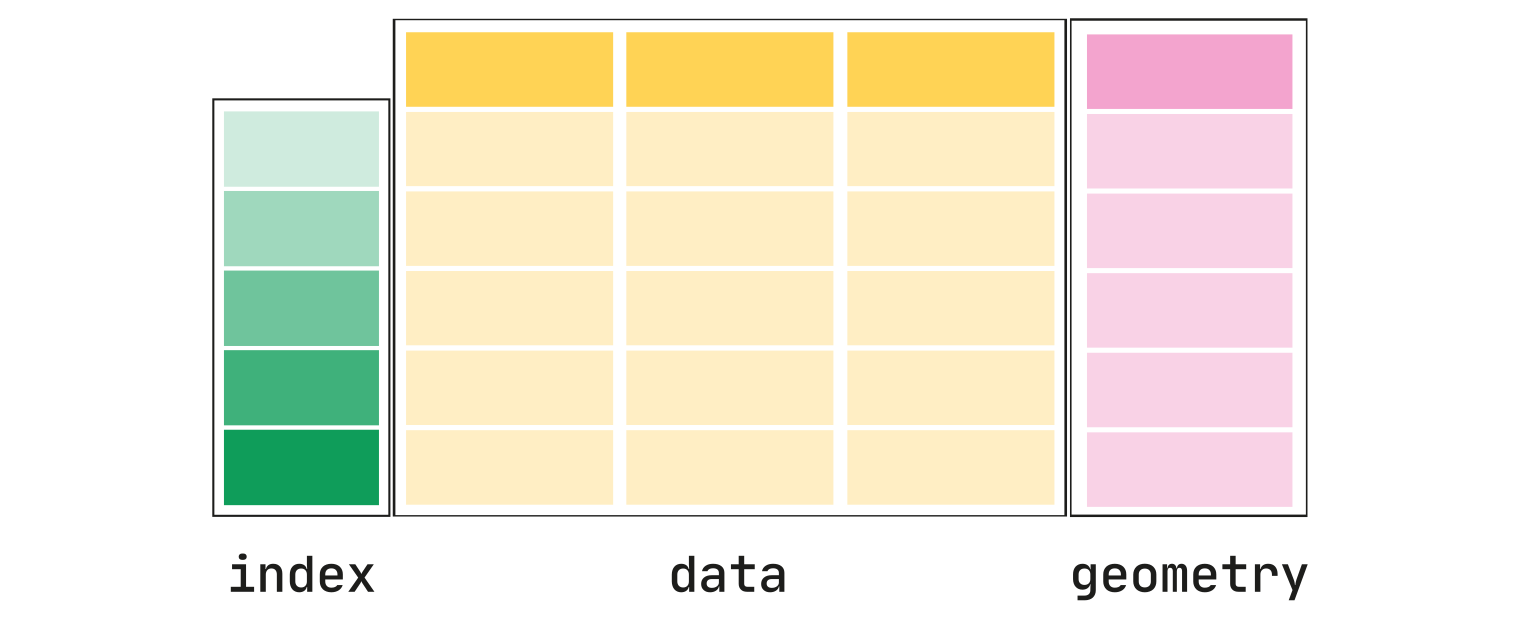
A GeoDataFrame is an object that inherits from a pandas.DataFrame, and as such it supports the APIs that pandas provides, but also new powerful APIs for geometric manipulation.
The core data structure in GeoPandas is the geopandas.GeoDataFrame, that can store geometry columns and perform spatial operations. The geopandas.GeoSeries handles the geometries. Therefore, your GeoDataFrame is a combination of pandas.Series, with traditional data (numerical, boolean, text etc.), and geopandas.GeoSeries, with geometries (points, polygons etc.).
The geometry column is what contains the spatial information.
In SpatialData, only dataframes where all the geometries are polygons/multipolygons are supported, either where all the geometries are shapely.Point and a column called radius is present. One can add new regular columns to the dataframe.
sdata_visium_hd['Visium_HD_3prime_Mouse_Brain_square_008um']
| geometry | |
|---|---|
| location_id | |
| 0 | POLYGON ((6185.027 7974.939, 6185.027 7945.728... |
| 1 | POLYGON ((3773.779 16118.174, 3773.779 16088.9... |
| 2 | POLYGON ((14157.852 7641.397, 14157.852 7612.1... |
| 3 | POLYGON ((4094.873 12784.773, 4094.873 12755.5... |
| 4 | POLYGON ((19208.134 3886.285, 19208.134 3857.0... |
| ... | ... |
| 376414 | POLYGON ((4216.623 16640.133, 4216.623 16610.9... |
| 376415 | POLYGON ((18752.337 18410.528, 18752.337 18381... |
| 376416 | POLYGON ((8438.564 5121.085, 8438.564 5091.873... |
| 376417 | POLYGON ((13278.098 7269.386, 13278.098 7240.1... |
| 376418 | POLYGON ((2570.9 12243.171, 2570.9 12213.959, ... |
376419 rows × 1 columns
sdata_visium_hd.pl.render_shapes("Visium_HD_3prime_Mouse_Brain_square_008um").pl.show()
