ELIXIR Spatial course
Practical 6: Multi-slice spatial data integration
8th October 2026
Benedetta Manzato, Emma Vonk (Leiden University Medical Center)
- Uni-modal slides alignment with CAST
- Uni-modal slides alignment with COAST
- Multi-modal slides alignment with COAST
import os
import warnings
import anndata as ad
import matplotlib.pyplot as plt
import numpy as np
import pandas as pd
import scanpy as sc
from PIL import Image
warnings.filterwarnings("ignore")
Read data
# Set up paths
base_dir = "../data/Practical6_2/data/"
coord_files = [
f"{base_dir}/unimodal/coord/coronal_1.csv",
f"{base_dir}/unimodal/coord/coronal_2.csv"
]
image_files = [
f"{base_dir}/unimodal/img/coronal_1.png",
f"{base_dir}/unimodal/img/coronal_2.png"
]
moldata_files = [
f"{base_dir}/unimodal/mol_data/coronal_1.h5ad",
f"{base_dir}/unimodal/mol_data/coronal_2.h5ad"
]
Inspect your images:
fig, axes = plt.subplots(1, 2, figsize=(12, 6), dpi=200)
for ax, img_path in zip(axes, image_files):
img = Image.open(img_path)
ax.imshow(img)
ax.axis('off')
ax.set_title(f"{os.path.basename(img_path)} - Size: {img.size[0]}x{img.size[1]}",
fontsize=12)
plt.tight_layout()
plt.show()

Make sure that the coordinate file and the images are in the same coordinate framework: plot images with coordinates overlaid
fig, axes = plt.subplots(1, 2, figsize=(12, 6), dpi=200)
for ax, img_path, coord_path in zip(axes, image_files, coord_files):
# Load image
img = Image.open(img_path)
# Load coordinates (support csv, h5ad, h5)
if coord_path.endswith(".csv"):
df = pd.read_csv(coord_path, index_col=0)
elif coord_path.endswith(".h5ad"):
adata = sc.read_h5ad(coord_path)
df = adata.obs[['x', 'y']].copy()
elif coord_path.endswith(".h5"):
adata = sc.read_10x_h5(coord_path)
df = adata.obs[['x', 'y']].copy()
else:
raise ValueError(f"Unsupported coordinate file: {coord_path}")
# Plot image
ax.imshow(img)
# Overlay points
if 'x' in df.columns and 'y' in df.columns:
ax.scatter(df['x'], df['y'], s=5, c='blue', alpha=0.5)
ax.axis('off')
ax.set_title(f"{os.path.basename(img_path)}\nSize: {img.size[0]}x{img.size[1]}",
fontsize=10)
plt.tight_layout()
plt.show()

import gc
# collect garbage
gc.collect()
4794
1. Uni-modal alignment using CAST
Search and match across spatial omics samples at single-cell resolution (Tang et al. 2024)
import CAST
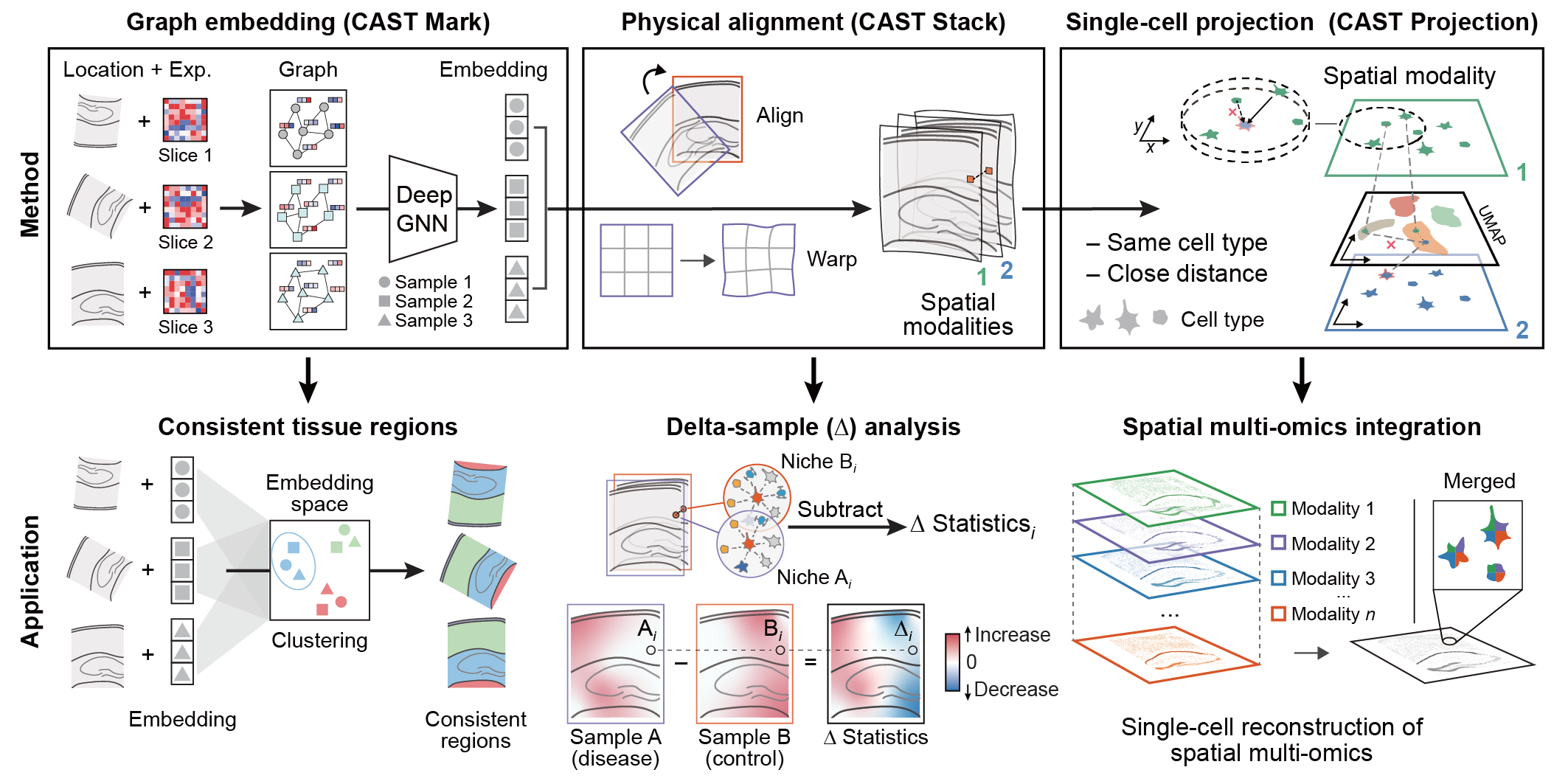
- CAST Mark method only require the following data modalities:
- gene expression raw counts
- spatial coordinates of the cells
- We organize spatial omics data in the AnnData format:
adata.Xstores the gene expression raw countsadata.obscontains important cell-level annotation, including spatial coordinates (column name:'x','y')- Data for different experimental samples are combined in a single Anndata object (column name
'sample')
Settings
# Load data
adata1 = ad.read_h5ad(f'{base_dir}/unimodal/mol_data/coronal_1.h5ad')
adata2 = ad.read_h5ad(f'{base_dir}/unimodal/mol_data/coronal_1.h5ad')
adata1.obs['sample'] = 'section1'
adata2.obs['sample'] = 'section2'
# Define a cleanup function to fix .var duplicates
def prepare_adata(adata, name):
if adata.var.index.duplicated().any():
print(f"Found duplicate gene names in {name}. Fixing now...")
adata.var_names_make_unique() # This appends '-1', '-2' etc. to duplicate gene names
return adata
# Apply to both
adata1 = prepare_adata(adata1, 'section1')
adata2 = prepare_adata(adata2, 'section2')
# 3. Concatenate using index_unique to handle .obs collision
adata = ad.concat(
[adata1, adata2],
keys=['sec1', 'sec2'],
index_unique='_'
)
Found duplicate gene names in section1. Fixing now... Found duplicate gene names in section2. Fixing now...
adata.layers['norm_1e4'] = sc.pp.normalize_total(adata, target_sum=1e4, inplace=False)['X'].toarray() # we use normalized counts for each cell as input gene expression
samples = np.unique(adata.obs['sample']) # used samples in adatas
coords_raw = {sample_t: np.array(adata.obs[['x','y']])[adata.obs['sample'] == sample_t] for sample_t in samples}
exp_dict = {sample_t: adata[adata.obs['sample'] == sample_t].layers['norm_1e4'] for sample_t in samples}
Run
outdir = f'{base_dir}/CAST_outputs/'
if not os.path.exists(outdir):
os.makedirs(outdir)
### Run the model to generate the graph embedding
#embed_dict = CAST.CAST_MARK(coords_raw,exp_dict,outdir)
### CPU with single core may takes long time for each epoch. If it takes too long, you could set:
embed_dict = CAST.CAST_MARK(coords_raw,exp_dict,outdir,epoch_t = 10)
Constructing delaunay graphs for 2 samples... Training on cpu...
Loss: -274.209 step time=12.398s: 100%|██████████| 10/10 [02:18<00:00, 13.84s/it]
Finished. The embedding, log, model files were saved to ../data/Practical6_2/data//CAST_outputs/

CAST.kmeans_plot_multiple(embed_dict, samples, coords_raw, 'coronal', outdir, k=15, dot_size=20, minibatch=False)
Perform KMeans clustering on 4620 cells... Plotting the KMeans clustering results...
array([ 4, 3, 7, ..., 13, 1, 3], shape=(4620,), dtype=int32)

To align the slices with preserving the cell organization, CAST_STACK() is used to perform gradient-descent-based rigid registration and free-form deformation (FFD) to get a proper transformation.
Here are the parameters used in this function:
coords_raw- The dictionary of the coordinates matrix with sample name.embed_dict- The dictionary of the graph embedding generated by CAST Mark with sample name.output_path- The output folder path.graph_list- The list of [query sample,reference sample]. The query sample will be aligned to the reference sample.params_dist- The parameter dictionary for the CAST Stack.dataname- The dataset name.gpu- The index of the gpu if the GPU device is available.
Affine parameters
iterations- Iterations of the affine transformation.alpha_basis- The coefficient for updating the affine transformation parameter.dist_penalty1- Distance penalty parameter in affine transformation. When the distance of the query cell to the nearest neighbor in reference sample is greater than a distance threshold (by default, average cell distance), CAST Stack will add additional distance penalty. The initial cost function value of these cells will be multiplied by thedist_penalty1. The value0indicates no additional distance penalty.bleeding- When the reference sample is larger than the query sample, for efficient computation, only the region of the query sample with bleeding distance will be considered when calculating the cost function.d_list- CAST Stack will perform pre-location to find an initial alignment. The value in thed_listwill be multiplied by the query sample to calculate the cost function. For example, 2 indicates the two-fold increase of the coordinates.attention_params- The attention mechanism to increase the penalty of the cells. It is invalid when thedist_penalty= 0.1st - attention_region- The True/False index of all the cells of the query sample or None.2nd - double_penalty- Theaverage cell distance / double_penaltywill be used in distance penalty for the cells with attention.3rd - penalty_inc_all- The additional penalty for the attention cells. The initial cost function value of these cells will be multiplied bypenalty_inc_all.4th - penalty_inc_both- The additional penalty for the cells with distance penalty and attention. The initial cost function value of these cells will be multiplied by(penalty_inc_both/dist_penalty + 1).
FFD parameters
dist_penalty2- Distance penalty parameter in FFD. Refer todist_penalty1.alpha_basis_bs- The coefficient for updating the FFD parameter.meshsize- mesh size for the FFD.iterations_bs- Iterations of the FFD.attention_params_bs- The attention mechanism to increase the penalty of the cells. Refer toattention_params.mesh_weight- The weight matrix for the mesh grid. The same size of the mesh or None.
import torch
query_sample = 'section2'
params_dist = CAST.reg_params(dataname = query_sample,
#gpu = 0 if torch.cuda.is_available() else -1,
diff_step = 5,
#### Affine parameters
iterations=500,
dist_penalty1=0,
bleeding=500,
d_list = [3,2,1,1/2,1/3],
attention_params = [None,3,1,0],
#### FFD parameters
dist_penalty2 = [0],
alpha_basis_bs = [500],
meshsize = [8],
iterations_bs = [400],
attention_params_bs = [[None,3,1,0]],
mesh_weight = [None])
params_dist.alpha_basis = torch.Tensor([1/1000,1/1000,1/50,5,5]).reshape(5,1).to(params_dist.device)
coords_final = CAST.CAST_STACK(coords_raw,embed_dict,outdir,samples,params_dist)
Loss: 0.000: 100%|██████████| 500/500 [04:23<00:00, 1.89it/s] findfont: Font family 'Arial' not found. findfont: Font family 'Arial' not found. findfont: Font family 'Arial' not found. findfont: Font family 'Arial' not found. findfont: Font family 'Arial' not found. findfont: Font family 'Arial' not found. findfont: Font family 'Arial' not found. findfont: Font family 'Arial' not found. findfont: Font family 'Arial' not found. findfont: Font family 'Arial' not found. findfont: Font family 'Arial' not found. findfont: Font family 'Arial' not found. Loss: 0.000: 100%|██████████| 400/400 [04:45<00:00, 1.40it/s] findfont: Font family 'Arial' not found. findfont: Font family 'Arial' not found. findfont: Font family 'Arial' not found. findfont: Font family 'Arial' not found. findfont: Font family 'Arial' not found. findfont: Font family 'Arial' not found. findfont: Font family 'Arial' not found. findfont: Font family 'Arial' not found. findfont: Font family 'Arial' not found. findfont: Font family 'Arial' not found. findfont: Font family 'Arial' not found. findfont: Font family 'Arial' not found. 100%|██████████| 400/400 [00:53<00:00, 7.48it/s]


findfont: Font family 'Arial' not found. findfont: Font family 'Arial' not found. findfont: Font family 'Arial' not found.

findfont: Font family 'Arial' not found. findfont: Font family 'Arial' not found. findfont: Font family 'Arial' not found.


findfont: Font family 'Arial' not found. findfont: Font family 'Arial' not found. findfont: Font family 'Arial' not found.

findfont: Font family 'Arial' not found. findfont: Font family 'Arial' not found. findfont: Font family 'Arial' not found.


# collect garbage
gc.collect()
69258
Visualize the aligned coordinates:
section1 = pd.DataFrame(coords_final['section1'])
section2 = pd.DataFrame(coords_final['section2'])
plt.figure(figsize=(8, 6), dpi=300)
plt.scatter(section1[0], section1[1], color='#87c38f', label='section1', s=2, alpha=0.6)
plt.scatter(section2[0], section2[1], color='#b388eb', label='section2', s=2, alpha=0.6)
plt.xlabel('x', fontsize=8)
plt.ylabel('y', fontsize=8)
plt.legend(fontsize=7, markerscale=3)
plt.tick_params(axis='both', labelsize=7)
plt.title(' ')
plt.gca().set_aspect('equal', adjustable='box')
plt.show()

2. Uni-modal alignment using COAST
Image-guided alignment of consecutive multi-modal tissue slides (Manzato et al. 2026)
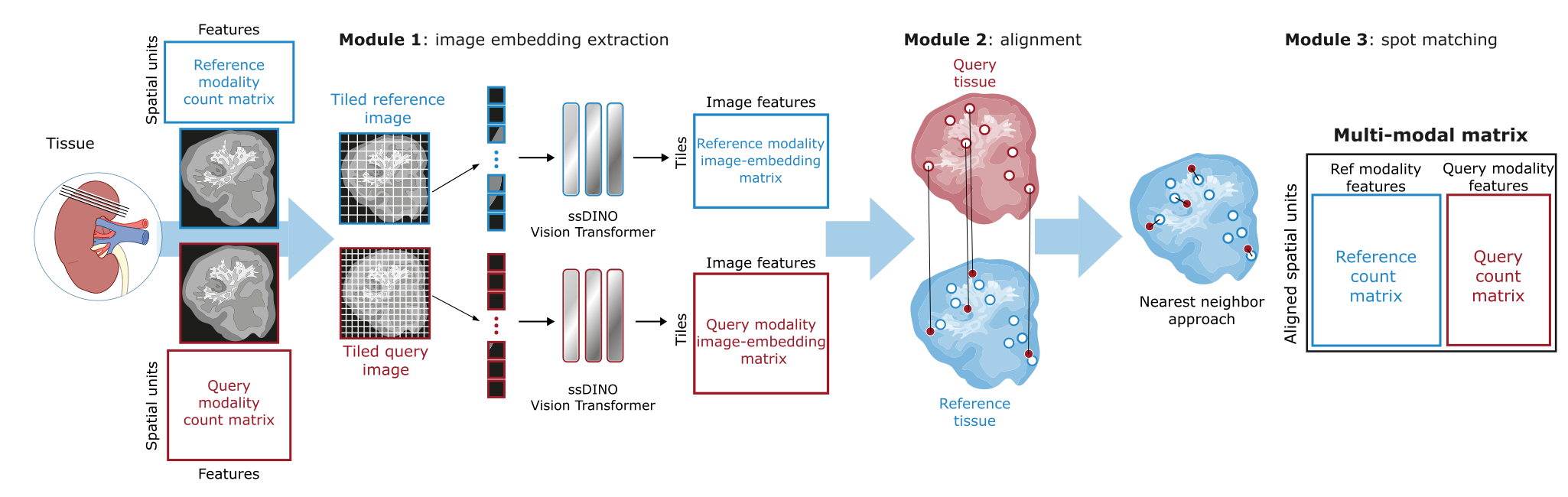
COAST makes use of the stained images associated with the molecular data. Make sure that the coordinate file and the images are in the same coordinate framework: plot images with coordinates overlaid
fig, axes = plt.subplots(1, 2, figsize=(12, 6), dpi=200)
for ax, img_path, coord_path in zip(axes, image_files, coord_files):
# Load image
img = Image.open(img_path)
# Load coordinates (support csv, h5ad, h5)
if coord_path.endswith(".csv"):
df = pd.read_csv(coord_path, index_col=0)
elif coord_path.endswith(".h5ad"):
adata = sc.read_h5ad(coord_path)
df = adata.obs[['x', 'y']].copy()
elif coord_path.endswith(".h5"):
adata = sc.read_10x_h5(coord_path)
df = adata.obs[['x', 'y']].copy()
else:
raise ValueError(f"Unsupported coordinate file: {coord_path}")
# Plot image
ax.imshow(img)
# Overlay points
if 'x' in df.columns and 'y' in df.columns:
ax.scatter(df['x'], df['y'], s=5, c='blue', alpha=0.5)
ax.axis('off')
ax.set_title(f"{os.path.basename(img_path)}\nSize: {img.size[0]}x{img.size[1]}",
fontsize=10)
plt.tight_layout()
plt.show()

Module 1: extract image features from high-resolution image
Using a pretrained Vision Transformer, extract_features extracts and saves features for each file in each of the two images, separately.
extract_features function arguments
- coord_path (str, required)
• Path to the CSV file containing spot coordinates.
• Required columns:xandy(integer pixel coordinates).
• Index should be spot IDs (e.g., Visium barcodes).
• Spots must correspond to positions in the tissue image. - img_path (str, required)
• Path to the high-resolution tissue image.
• Supported formats: JPEG, PNG, TIFF.
• Spots in the coord file should correspond to positions in this image. - output_name (str, required)
• Prefix for the output CSV files.
- outdir (str, required)
• Directory where the ViT features folder and output CSVs will be saved. - patch_size (int, default=224)
• Width and height of each square patch (in pixels) extracted from the image. - step_size (int, default=224)
• Step size for grid-based patch extraction (in pixels).
• Determines the spacing between grid patches. - pad (str, default='none')
• Options:none,left,right,top,bottom.
• Adds padding to the image before patch extraction to further guide the alignment. - mode (str, default='moldata')
• Options:moldata(tissue-guided + grid patches) ornomoldata(grid patches only).
# set output name as the name of the image files
tissues = [os.path.splitext(os.path.basename(f))[0] for f in image_files]
tissues
['coronal_1', 'coronal_2']
outdir = f'{base_dir}/COAST_outputs/'
if not os.path.exists(outdir):
os.makedirs(outdir)
The following command might take some time (around 30 mins for the extraction of image features of a single section). You can uncomment it and run it, then you can interrupt the kernel. The output is already saved in {base_dir}/COAST_outputs/ViT_features/ for you
from COAST.extract_features import extract_features
# results = {}
# for section, output_name in zip(tissues, tissues):
# coord_file = f"{base_dir}/unimodal/coord/{section}.csv"
# img_file = f"{base_dir}/unimodal/img/{section}.png"
# features, coords = extract_features(
# coord_path=coord_file,
# img_path=img_file,
# output_name=output_name,
# outdir=f"{outdir}/",
# patch_size=64,
# step_size=64,
# pad="none",
# mode="moldata"
# )
# results[output_name] = {"features": features, "coords": coords}
# print(f"[INFO] Finished extracting features for {section}")
# print('\n\n')
Read and inspect the ViT features:
# read coordinates of tile centers
section1_vit_coord = pd.read_csv(f"{base_dir}/COAST_outputs/ViT_features/coronal_1_vit_coord.csv",index_col=0)
# read embedding
section1_vit_feat = pd.read_csv(f"{base_dir}/COAST_outputs/ViT_features/coronal_1_vit_mf.csv",index_col=0)
section1_vit_coord.head()
| x | y | |
|---|---|---|
| AACACTTGGCAAGGAA-1_intissue | 927 | 1164 |
| AACAGGATTCATAGTT-1_intissue | 1223 | 1201 |
| AACAGGTTATTGCACC-1_intissue | 767 | 815 |
| AACAGGTTCACCGAAG-1_intissue | 1244 | 1238 |
| AACATCTAATGACCGG-1_intissue | 1096 | 1532 |
section1_vit_feat.head()
| feat_0 | feat_1 | feat_2 | feat_3 | feat_4 | feat_5 | feat_6 | feat_7 | feat_8 | feat_9 | ... | feat_374 | feat_375 | feat_376 | feat_377 | feat_378 | feat_379 | feat_380 | feat_381 | feat_382 | feat_383 | |
|---|---|---|---|---|---|---|---|---|---|---|---|---|---|---|---|---|---|---|---|---|---|
| AACACTTGGCAAGGAA-1_intissue | 0.090842 | 0.322119 | -1.986236 | 6.935638 | -3.567332 | -3.042136 | 0.639086 | -6.122275 | -1.082596 | -0.241048 | ... | 6.887070 | 3.109592 | 2.072388 | -0.495291 | 2.628279 | 1.910639 | -6.458354 | 3.810957 | -1.622335 | -7.119933 |
| AACAGGATTCATAGTT-1_intissue | 2.101917 | 3.833639 | -7.839350 | 0.750762 | -3.958435 | -0.852773 | 6.915039 | -8.956213 | 1.093866 | 3.054830 | ... | 6.807681 | 3.497174 | 4.034980 | 0.547821 | 3.180295 | 4.144976 | -1.126662 | -0.565195 | -0.804420 | 0.932689 |
| AACAGGTTATTGCACC-1_intissue | 4.578136 | 5.970033 | -6.434759 | 0.821866 | -1.429066 | -4.461685 | 9.665450 | -6.660032 | -3.300245 | 4.725465 | ... | 7.469927 | 5.631037 | 1.703169 | 0.595680 | -0.037976 | 4.923856 | -3.119935 | -0.919733 | -3.076985 | -1.544456 |
| AACAGGTTCACCGAAG-1_intissue | 3.325086 | 4.122218 | -8.625838 | 0.400831 | -3.802899 | -0.115496 | 7.273905 | -8.659063 | 1.832504 | 3.357986 | ... | 6.537242 | 3.548212 | 3.765350 | 0.685497 | 3.529929 | 4.278205 | -2.864853 | -0.259416 | -0.746580 | 1.368260 |
| AACATCTAATGACCGG-1_intissue | -0.471118 | 10.672870 | -11.297558 | 0.378509 | -2.207745 | -0.445758 | 1.465649 | -7.635321 | -0.279359 | 4.379900 | ... | 6.747020 | 3.297310 | 6.856185 | -1.793808 | 3.098197 | 3.952853 | -1.447105 | -1.379544 | -2.665621 | 0.030887 |
5 rows × 384 columns
Plot values of selected features from the embedding:
feat = section1_vit_feat.var().idxmax() ### feature with highest variability, but you can also pick it manually
#feat = "feat_300"
color_vals = section1_vit_feat[feat]
fig, ax = plt.subplots(figsize=(8, 8),dpi=200)
sc = ax.scatter(
section1_vit_coord["x"], section1_vit_coord["y"],
c=color_vals,
cmap="viridis",
s=18,
linewidths=0,
)
cb = plt.colorbar(sc, ax=ax, label=feat, shrink=0.7)
cb.ax.tick_params(labelsize=6)
cb.set_label(feat, fontsize=6)
ax.set_aspect("equal")
ax.set_title(feat, fontsize=7)
for spine in ax.spines.values():
spine.set_visible(False)
ax.set_xticks([])
ax.set_yticks([])
plt.tight_layout()
plt.show()

Visualize the in-tissue and grid patches
image_files = sorted([
os.path.join(f"{base_dir}/unimodal/img/", f) for f in os.listdir(f"{base_dir}/unimodal/img/")
if f.lower().endswith(('.tif', '.tiff', '.png', '.jpg'))
])
vit_coord_files = sorted([
os.path.join(f"{outdir}/ViT_features/", f) for f in os.listdir(f"{outdir}/ViT_features/")
if f.lower().endswith('_vit_coord.csv')
])
fig, axes = plt.subplots(1, len(image_files), figsize=(6*len(image_files), 6), dpi=200)
for ax, img_path, coord_path in zip(axes, image_files, vit_coord_files):
# Load image
img = Image.open(img_path)
# Load coordinates
df = pd.read_csv(coord_path, index_col=0)
# Determine dot colors
colors = ['blue' if str(idx).endswith('_intissue') else 'red' for idx in df.index]
# Plot
ax.imshow(img)
ax.scatter(df['x'], df['y'], s=3, c=colors, alpha=0.6)
ax.axis('off')
ax.set_title(os.path.basename(img_path), fontsize=14)
plt.tight_layout()
plt.show()

Here we can visualize tissue sections using features extracted from high-resolution images. run_umap_clustering performs three main tasks:
- UMAP clustering: Combines features from all tissue sections, reduces their dimensionality with UMAP, and groups similar tiles into clusters. Clusters are shown both by color and by tissue section.
- Spatial plots: Shows the location of each tile on the original tissue image, colored by cluster, so you can see how similar regions are distributed spatially.
When background=True, the plot includes both tissue-guided and grid patches; when background=False, only the molecular-data spots are shown.
from COAST.coast_visualization import run_umap_clustering
df_all = run_umap_clustering(outdir, n_clusters=9, spot_size=10, background=False)
[INFO] Loaded 4545 patches from 2 sections [INFO] Saved: ../data/Practical6_2/data//COAST_outputs/ViT_features/umap_clusters_concatenated_sections.csv

[INFO] Saved: ../data/Practical6_2/data//COAST_outputs/visualization/umap_clusters.png

[INFO] Saved: ../data/Practical6_2/data//COAST_outputs/visualization/umap_by_section.png

[INFO] Saved: ../data/Practical6_2/data//COAST_outputs/visualization/spatial_clusters.png
Now we will use the morphology image embeddings to map the query spots to the reference coordinate space
Module 2: Alignment with CAST
run_cast function arguments
- outdir (str, required)
• Base output directory for COAST / ViT features.
• Expects a subfolderViT_features/containing*_vit_mf.csvand*_vit_coord.csvfiles for each tissue.
• Will create aCAST_output/subfolder to store aligned coordinates.
•
CAST_output/*_aligned.csv: Aligned coordinates for each tissue, indexed by original patch IDs.• Tensors used in alignment saved as
.pt files for reproducibility.
from COAST.CAST_alignment import run_cast
run_cast(outdir)
[INFO] Loaded tissue 'coronal_1' with 3209 tiles [INFO] Loaded tissue 'coronal_2' with 3041 tiles [INFO] Concatenating all tissues for CAST... [INFO] Total tiles: 6250 Preprocessing... The number of nodes is larger than the total number of nodes. Return the original data. The number of nodes is larger than the total number of nodes. Return the original data. [INFO] Running CAST_STACK...
Loss: 899.502: 100%|██████████| 500/500 [06:49<00:00, 1.22it/s] findfont: Font family 'Arial' not found. findfont: Font family 'Arial' not found. findfont: Font family 'Arial' not found. findfont: Font family 'Arial' not found. findfont: Font family 'Arial' not found. findfont: Font family 'Arial' not found. findfont: Font family 'Arial' not found. findfont: Font family 'Arial' not found. findfont: Font family 'Arial' not found. findfont: Font family 'Arial' not found. findfont: Font family 'Arial' not found. findfont: Font family 'Arial' not found. Loss: 1001.671: 100%|██████████| 400/400 [08:29<00:00, 1.27s/it] findfont: Font family 'Arial' not found. findfont: Font family 'Arial' not found. findfont: Font family 'Arial' not found. findfont: Font family 'Arial' not found. findfont: Font family 'Arial' not found. findfont: Font family 'Arial' not found. findfont: Font family 'Arial' not found. findfont: Font family 'Arial' not found. findfont: Font family 'Arial' not found. findfont: Font family 'Arial' not found. findfont: Font family 'Arial' not found. findfont: Font family 'Arial' not found. 100%|██████████| 400/400 [01:13<00:00, 5.45it/s]
[INFO] CAST alignment completed. Aligned coordinates saved to ../data/Practical6_2/data//COAST_outputs/CAST_output


findfont: Font family 'Arial' not found. findfont: Font family 'Arial' not found. findfont: Font family 'Arial' not found.

findfont: Font family 'Arial' not found. findfont: Font family 'Arial' not found. findfont: Font family 'Arial' not found.


findfont: Font family 'Arial' not found. findfont: Font family 'Arial' not found. findfont: Font family 'Arial' not found.

findfont: Font family 'Arial' not found. findfont: Font family 'Arial' not found. findfont: Font family 'Arial' not found.


After aligning multiple tissue sections with CAST, plot_final_aligned_scatter shows all sections together in the common coordinate space.
When background=True, the plot includes both tissue-guided and grid patches; when background=False, only the molecular-data spots are shown.
from COAST.coast_visualization import plot_final_aligned_scatter
plot_final_aligned_scatter(outdir, spot_size=15, background=False)

[INFO] Final aligned scatterplot saved in: ../data/Practical6_2/data//COAST_outputs/visualization/aligned_tissues_nobg.png
Module 3: kNN spot matching
This module builds a combined dataset from two tissue sections. Spots are matched using a KD-tree based on the closest Euclidean distance, with a maximum distance threshold that should be chosen according to the step size between molecular spots.
- match_spots: Matches spots between tissues using KD-tree based on the closest Euclidean distance and uses a distance threshold (
max_distancethat should be chosen according to the step size between molecular spots. - build_multimodal_anndata: Combines matched features into a single AnnData object. If metadata is provided, it is concatenated in
.obs.
The final AnnData is saved to outdir/multimodal_anndata/multimodal_dataset.h5ad.
from COAST.spot_matching import build_multimodal_anndata, match_spots
max_distance = 64
# Returns DataFrame with aligned indices
ccf_matches = match_spots(outdir, max_distance=max_distance)
ccf_matches.head()
| x_aligned | y_aligned | query_idx | ref_idx | |
|---|---|---|---|---|
| AACACTTGGCAAGGAA-1_intissue | 783.89290 | 1127.5591 | CTAATCTGGCCGTGTT-1_intissue | AACACTTGGCAAGGAA-1_intissue |
| AACAGGATTCATAGTT-1_intissue | 1145.06120 | 1156.0455 | CGTAACATTCGCGATA-1_intissue | AACAGGATTCATAGTT-1_intissue |
| AACAGGTTATTGCACC-1_intissue | 561.93115 | 710.0507 | GGATGGATCACTCATA-1_intissue | AACAGGTTATTGCACC-1_intissue |
| AACAGGTTCACCGAAG-1_intissue | 1173.69430 | 1200.3945 | CTCACGTATTCAAGCG-1_intissue | AACAGGTTCACCGAAG-1_intissue |
| AACATCTAATGACCGG-1_intissue | 1015.24615 | 1573.9203 | AGGCGATTCCACTTCT-1_intissue | AACATCTAATGACCGG-1_intissue |
multimodal_anndata = build_multimodal_anndata(
outdir=outdir,
mol_dir=f"{base_dir}/unimodal/mol_data/",
coord_dir=f"{base_dir}/unimodal/coord/",
#metadata=f"{base_dir}/unimodal/input_data/",
max_distance=max_distance
)
coronal_1.h5ad (molecular data) is paired with coronal_1.csv (coord) coronal_2.h5ad (molecular data) is paired with coronal_2.csv (coord) Saved multimodal AnnData to ../data/Practical6_2/data//COAST_outputs/multimodal_anndata/multimodal_dataset.h5ad, shape=(2115, 65178)
multimodal_anndata.var
| tissue | |
|---|---|
| Xkr4_tissue1 | tissue1 |
| Gm1992_tissue1 | tissue1 |
| Gm19938_tissue1 | tissue1 |
| Gm37381_tissue1 | tissue1 |
| Rp1_tissue1 | tissue1 |
| ... | ... |
| DEPRECATED_ENSMUSG00000090523_tissue2 | tissue2 |
| DEPRECATED_ENSMUSG00000090698_tissue2 | tissue2 |
| DEPRECATED_ENSMUSG00000091537_tissue2 | tissue2 |
| DEPRECATED_ENSMUSG00000100916_tissue2 | tissue2 |
| DEPRECATED_ENSMUSG00000105547_tissue2 | tissue2 |
65178 rows × 1 columns
gc.collect()
70510
3. Multi-modal alignment using COAST
Image-guided alignment of consecutive multi-modal tissue slides (Manzato et al. 2025)
Multi-modal dataset: Spatial Transcriptomics and Spatial Metabolomics of IRI Mouse Kidney
IRI: Ischemia reperfusion injury
Data availability:
- Spatial Transcriptomics: GSE298899 (obtained with Stereo-seq technology)
- Spatial Metabolomics: https://zenodo.org/records/17722895 (obtained with MALDI-MSI technology).
# Setup paths
coord_files = [
f"{base_dir}/multimodal/coast_input/coord_data/msi_IRI1.csv",
f"{base_dir}/multimodal/coast_input/coord_data/ss_IRI1.h5ad"
]
image_files = [
f"{base_dir}/multimodal/coast_input/img/msi_IRI1.tif",
f"{base_dir}/multimodal/coast_input/img/ss_IRI1.tif",
]
moldata_files = [
f"{base_dir}/multimodal/coast_input/mol_data/msi_data.csv",
f"{base_dir}/multimodal/coast_input/mol_data/stereoseq_IRI1.h5ad"
]
Visualize images
fig, axes = plt.subplots(1, 2, figsize=(12, 6), dpi=200)
for ax, img_path in zip(axes, image_files):
img = Image.open(img_path)
ax.imshow(img, cmap='gray')
ax.axis('off')
ax.set_title(f"{os.path.basename(img_path)} - Size: {img.size[0]}x{img.size[1]}",
fontsize=12)
plt.tight_layout()
plt.show()

Again, make sure that the coordinate file and the images are in the same coordinate framework: plot images with coordinates overlaid
import scanpy as sc
fig, axes = plt.subplots(1, 2, figsize=(12, 6), dpi=200)
for i, (ax, img_path, coord_path) in enumerate(zip(axes, image_files, coord_files)):
# Load image
img = Image.open(img_path)
# Load coordinates (support csv, h5ad, h5)
if coord_path.endswith(".csv"):
df = pd.read_csv(coord_path, index_col=0)
elif coord_path.endswith(".h5ad"):
adata = sc.read_h5ad(coord_path)
df = adata.obs[['x', 'y']].copy()
else:
raise ValueError(f"Unsupported coordinate file: {coord_path}")
# sampling for memory efficiency
total_spots = len(df)
# --- Sample different percentages based on tissue index ---
# i == 0 is the first tissue (10%), i == 1 is the second tissue (80%)
fraction = 0.1 if i == 0 else 0.8
if 'x' in df.columns and 'y' in df.columns:
df_sampled = df.sample(frac=fraction, random_state=42)
else:
df_sampled = df
ax.imshow(img, cmap='gray')
# Overlay sampled points
if 'x' in df_sampled.columns and 'y' in df_sampled.columns:
ax.scatter(df_sampled['x'], df_sampled['y'], s=0.1, c='blue', alpha=0.5)
ax.axis('off')
pct_label = f"{int(fraction * 100)}%"
title_text = f"{os.path.basename(img_path)}\nSize: {img.size[0]}x{img.size[1]} | Total: {total_spots:,} (Plotted: {pct_label})"
ax.set_title(title_text, fontsize=10)
plt.tight_layout()
plt.show()

COAST requires GPU for high-resolution datasets with many datapoints. We precomputed the results for you with the following code:
Module 1
from COAST.extract_features import extract_features
results = {}
for section, output_name in zip(tissues, tissues):
coord_file = f"{base_dir}/multimodal/coast_input/coord_data/{section}.csv"
img_file = f"{base_dir}/multimodal/coast_input/img/{section}.tif"
features, coords = extract_features(
coord_path=coord_file,
img_path=img_file,
output_name=output_name,
outdir=outdir,
patch_size=224,
step_size=224,
pad="none",
mode="moldata"
)
results[output_name] = {"features": features, "coords": coords}
print(f"[INFO] Finished extracting features for {section}")
print('\n\n')
Module 2
from COAST.CAST_alignment import run_cast
run_cast(outdir)
Module 3
from COAST.spot_matching import match_spots, build_multimodal_anndata
max_distance = 64
# Returns DataFrame with aligned indices
ccf_matches = match_spots(outdir, max_distance=max_distance)
ccf_matches.head()
### only works if mode = 'moldata'
multimodal_anndata = build_multimodal_anndata(
outdir=outdir,
mol_dir=f"{base_dir}/multimodal/coast_input/mol_data",
coord_dir=f"{base_dir}/multimodal/coast_input/coord_data",
metadata=coord_dir,
max_distance=max_distance
)
Read and inspect the multimodal dataset:
multimodal_anndata = sc.read_h5ad(f"{base_dir}/multimodal/coast_output/multimodal_iri1.h5ad")
multimodal_anndata
AnnData object with n_obs × n_vars = 191123 × 3757
obs: 'nCount_RNA_tissue2', 'nFeature_RNA_tissue2', 'orig.ident_tissue2', 'x_tissue2', 'y_tissue2', 'nFeautre_RNA_tissue2', 'percent.mt_tissue2', 'nCount_SCT_tissue2', 'nFeature_SCT_tissue2', 'Seurat_Clusters_Res1_tissue2', 'Seurat_Clusters_Res1_labelled_tissue2', 'Seurat_Clusters_Res1_labelled_V2_tissue2', 'Seurat_Clusters_Res1_labelled_V3_tissue2', 'barcode'
var: 'modality'
layers: None (.X)
multimodal_anndata.var
| modality | |
|---|---|
| Sh3kbp1 | stereo-seq |
| Nhs | stereo-seq |
| Brwd3 | stereo-seq |
| Srpx2 | stereo-seq |
| Brcc3 | stereo-seq |
| ... | ... |
| 579.083 | msi |
| 606.147 | msi |
| 615.238 | msi |
| 625.259 | msi |
| 650.207 | msi |
3757 rows × 1 columns
Plot the aligned tissues in space:
msi_aligned = pd.read_csv(f"{base_dir}/multimodal/coast_output/coast_aligned_msi.csv",index_col=0)
ss_aligned = pd.read_csv(f"{base_dir}/multimodal/coast_output/coast_aligned_stereoseq.csv",index_col=0)
fig, ax = plt.subplots(figsize=(8, 6), dpi=300)
ax.scatter(msi_aligned['0'], -msi_aligned['1'], color='#87c38f', label='MSI', s=0.5, alpha=0.6)
ax.scatter(ss_aligned['0'], -ss_aligned['1'], color='#b388eb', label='Stereo-seq', s=0.5, alpha=0.6)
ax.legend(fontsize=10, markerscale=5, frameon=False,
handlelength=0.8, handletextpad=0.4)
ax.set_aspect('equal', adjustable='box')
ax.axis('off')
plt.tight_layout()
plt.show()
